Desk companion · Nº 01 · In development
A desk pet with a face that notices you.
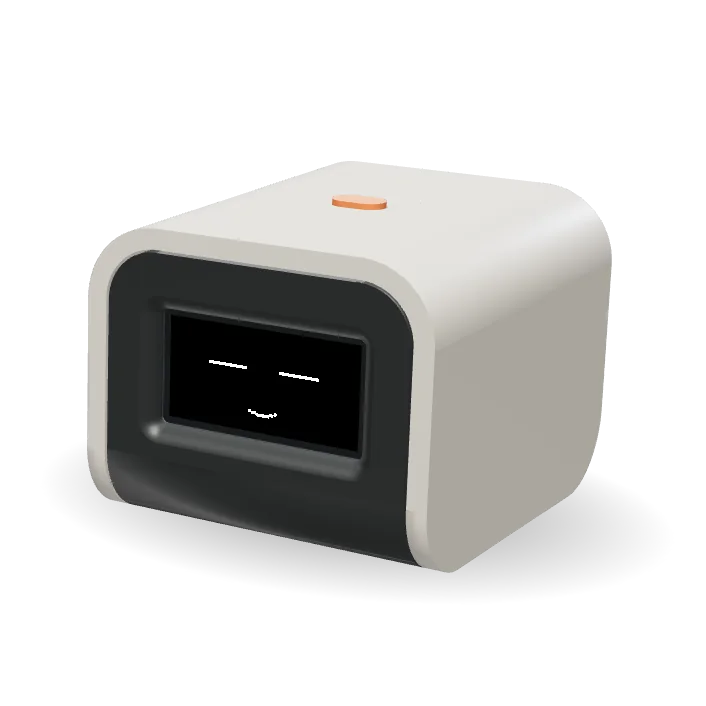
Baksho (বাক্স, Bangla for “box”) is a palm-sized desk companion. Pick it up, knock on it or leave it alone, and its little black-and-white face reacts, then remembers how you treated it.
- Size
- 53 × 44 × 60 mm
- Screen
- 128 × 64 OLED
- Needs
- No app, no Wi-Fi
Drag to turn · Ctrl + scroll to zoom · Click to pokeDrag to turn · Pinch to zoom · Tap to poke
01Face
Thirty-six faces on one tiny screen.
A crisp 128 × 64 pixel OLED, white on black. Baksho blinks, glances around, smiles, sulks and dozes off, every expression drawn pixel by pixel.
- 36 animated expressions
- Blinks and looks around on its own
- Falls asleep when left alone
Click Baksho to poke it.
02Senses
It notices you.
A motion sensor inside feels every pick-up, knock and shake. Each reaction has a real cause.
- 2.1
Pick it up
Startled for a moment, it looks left, right and up, then smiles for as long as you hold it.
- 2.2
Knock on it
A knock surprises it. It glances around, then decides whether it is pleased or suspicious.
- 2.3
Shake it
It gets dizzy, then shakes it off. Keep going and it starts to feel sick.
- 2.4
Turn it over
Upside down, it is confused. Set it right and it steadies itself with relief.
- 2.5
Leave it be
Left alone, it gets tired, dozes off, then turns its screen off. A nudge or a click wakes it.
- 2.6
It remembers
Its mood carries over. Gentle handling cheers it up; rough handling or neglect brings it down.
03Apps
One button. Tilt to scroll.
Click the orange button to open the menu, tilt Baksho to move through it, click again to choose. Double-click to go back.
- FocusWork and break timer
- BreathePaced breathing
- FluidWater you pour by tilting
- SnakeSteer by tilting
- BlocksFalling-block puzzle
- FlapClick to fly
- BricksBreak the wall
- Dice & CoinRoll a die, flip a coin
- Magic 8Ask it anything
- LevelA spirit level
- ScreensaversStars, rain, life and more
- Buzz & beepVibration and sound, adjustable or off
Point at an app to see it on Baksho’s screen.
04Object
A warm-grey shell over a charcoal tray.
A small desk gadget made to be handled. The shell slides over a tray that carries the screen and the electronics. One orange button sits on top. On the back: a USB-C port for charging, and its name in Bangla.
Drag to turn · Ctrl + scroll to zoom · Click to pokeDrag to turn · Pinch to zoom · Tap to poke
- Width
- 53mm
- Height
- 44mm
- Depth
- 60mm
- One button
- USB-C charging
- Works offline: no app, no account
05Specs
Inside the box
- Brain
- ESP32-S3 microcontroller
- Screen
- 128 × 64 OLED, white on black
- Senses
- 6-axis accelerometer and gyroscope
- Feedback
- Vibration motor and buzzer
- Controls
- One button, plus tilt
- Power
- Rechargeable battery, USB-C charging
- Size
- 53 × 44 × 60 mm
Baksho is still in development. Specifications may change before release.
06FAQ
Questions
Is Baksho a robot?
Not quite: it doesn’t drive around. It’s a desk pet, a small box with a face that reacts to how it is handled, using a motion sensor, a vibration motor and a buzzer.
Does it need an app or Wi-Fi?
No. Everything runs on Baksho itself. There is no app, no account and nothing to connect.
How do you charge it?
With a USB-C cable on the back. It has a built-in rechargeable battery.
How big is it?
53 × 44 × 60 mm. Small enough to sit beside your keyboard or on a bedside table.
When can I get one?
Baksho is still in development. Join the list and we will email you once, when it is ready.
What does বাক্স mean?
It is Bangla for “box”, pronounced BAK-sho.
07Join
Be the first to know.
Baksho is still being built. Leave your email and we will write once, when it is ready.
We only use your email to tell you when Baksho is available. We never share it.